How to Clean Messy Data
Have you ever found yourself frustrated by a disorganised dataset? You are not alone. Learning how to clean messy data is a critical skill for anyone working with information. In today’s world, data is everywhere, but it is rarely in a perfect, ready-to-use format.
In fact, a 2024 report by Datalere revealed that messy, duplicated, and fragmented data has spiraled into a full-blown crisis for businesses everywhere. This dirty data can lead to significant problems, and it’s a major issue.
So, how can you tame this data beast? This article is your comprehensive guide to the data cleaning process. We will walk you through the essential steps and techniques you need to become a data cleaning expert.
Why Cleaning Messy Data Is Essential
Before we get to the how, let’s explore the why. Many professionals might feel like cleaning data is a tedious and time-consuming task. They might even question its relevance in the real world. But here’s the deal: neglecting this crucial step can have severe consequences for your career and business.
Impact of Dirty Data on Analysis and Decision-Making
But why is clean data so important for analysis? The bottom line is that the quality of your insights is only as good as the quality of the data you use. Think about it: if you feed a machine learning model or a business intelligence tool bad data, you will get flawed and unreliable results.
This can lead to poor decision-making and costly mistakes. According to a 2024 report from Precisely, a significant 70% of professionals who struggle to trust their data say poor quality is the biggest issue. This lack of trust highlights a major problem.
What’s the bottom line? Dirty data can lead to decreased efficiency and revenue loss for companies. For example, a 2023 Forrester report estimated that more than a quarter of global data and analytics employees lose over $5 million annually due to poor data quality. This shows the direct financial impact.
Common Sources of Messy Data (Duplicates, Missing Values, Errors)
- Duplicates: This is a common problem. It happens when the same entry appears more than once. This can be caused by human error or system issues. Duplicates can result in incorrect numbers in your reports.
- Missing Values: Sometimes, data is just not there. It might be a blank cell in your spreadsheet. This can happen for many reasons. Perhaps the data was never collected or got lost.
- Errors: These can be small mistakes, like a typo in a name. They also include larger problems, such as incorrect date formats. These errors can make your data inconsistent and hard to use.
Read Also:
Step-by-Step Process to Clean Messy Data
Do you want to know how to clean messy data with a clear process? It’s easier than you think. This process can be broken down into a series of logical steps. This guide is designed to help you handle your datasets effectively. This is where the magic happens.
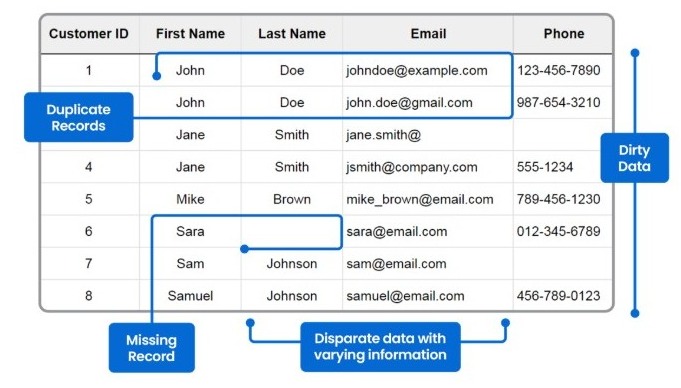
Image Credit: Datalere
Identifying Missing or Incomplete Data
The first step in any data cleaning process is to find what’s missing. Missing values can occur for several reasons. They can be blank cells or values like “N/A” or “unknown.” Here’s how to handle missing values in data.
- First, you must determine why the data is missing. Is it a random occurrence, or is there a pattern to it? For example, is a specific column always empty?
- Next, you decide how to handle the empty fields. You could remove the entire row or column, or you could fill it with a placeholder.
- Then, you might use an average or a median from the existing data to fill in the missing spots. This is also called imputation.
Removing Duplicates and Irrelevant Entries
What’s another key part of this process? Removing duplicates and irrelevant data. Duplicate rows can seriously skew your analysis and produce inaccurate insights. For example, if you have a list of customer data, a single person might have multiple entries. This could cause you to overcount them in your reports.
So, how do you handle this? You need to identify and remove all duplicate rows. Similarly, irrelevant data, which is data that is not necessary for your analysis, should also be removed. This simplifies your dataset, making it easier to work with.
Standardising Formats (Dates, Text, Numbers)
However, consider this: inconsistent formats. This is a common issue with many datasets. Dates may be in different formats, such as MM/DD/YYYY or DD-MM-YY. Text data might have inconsistent capitalisation. For example, “New York” and “new york” should be the same.
The solution is to standardise everything. You must ensure all dates, text strings, and numbers follow a consistent format. This is one of the data preprocessing steps. This step ensures that your data is uniform and easy to analyse.
Handling Outliers and Inconsistent Values
What about outliers? An outlier is a data point that is very different from other observations in the same dataset. For example, a person’s age listed as 200 would be an obvious outlier. These values can significantly distort your analysis and lead to a wrong conclusion.
But how do you handle these? You need to investigate them to determine if they are genuine data points or errors. If there are errors, you can remove or correct them. Correctly handling these issues is another way to successfully clean messy data.
Read Also:
Tools and Techniques for a Better Way to Clean Messy Data
Do you want to find the best way to clean messy data? There are many tools and techniques available to help you. The right choice depends on the size of your dataset and your specific needs. From simple spreadsheet functions to complex programming libraries, you have many options.

Image Credit: Ingestro
Excel Functions for Quick Fixes
For small datasets, a tool like Microsoft Excel is a great starting point. Many people are curious about how to clean data in Excel. Excel offers many functions that can help. You can use features like “Remove Duplicates” to quickly eliminate redundant rows.
You can use formulas like TRIM and CLEAN to remove extra spaces or non-printable characters from text. For more advanced tasks, you can use the Text to Columns feature to split data.
You can also use VLOOKUP to handle data matching. These simple yet effective tools for data cleaning can save you a significant amount of time and effort.
SQL for Data Validation and Cleaning
How can you use this technique for larger datasets? SQL is a great option for that. For professionals, data cleaning in SQL is a powerful and efficient method. You can use SQL queries to find and fix data issues. For example, you can use a GROUP BY clause with COUNT to find duplicate entries in your tables.
You can also use a WHERE clause to filter out null values or identify outliers. Using UPDATE statements, you can then correct or standardise data. Using SQL for the data cleaning process allows you to handle very large datasets efficiently.
Python and Pandas for Automated Cleaning
But what if you need to automate everything? For automating and handling massive amounts of data, Python data cleaning for beginners is an excellent approach. Python, with its powerful libraries, is a go-to tool for data scientists and analysts.
The Pandas library, in particular, makes data cleaning incredibly simple. With Pandas, you can load data into a DataFrame and use functions like .dropna() to handle missing values. You can also use .drop_duplicates() to remove redundant entries.
Pandas is one of the most popular tools for data cleaning, and for a very good reason. It provides a simple way to write reusable cleaning scripts.
Using Data Cleaning Software and AI Tools
But wait, there’s more. There are also many dedicated software tools designed specifically for data cleansing. These tools often have user-friendly interfaces. They can help you with tasks such as data profiling, validation, and standardisation. For example, OpenRefine and Trifacta are popular options.
What’s more, new AI-powered tools are emerging that can automate much of this work. These tools can automatically detect anomalies and suggest corrections. This is a significant advantage for professionals seeking to work more efficiently.
Read Also:
Best Practices to Keep Data Clean Long-Term
So, now that you know how to clean messy data, how do you prevent it from happening again? The most important thing to remember is that data cleaning should not be a one-time event. It is an ongoing process. Implementing a few key strategies will save you countless hours in the future.
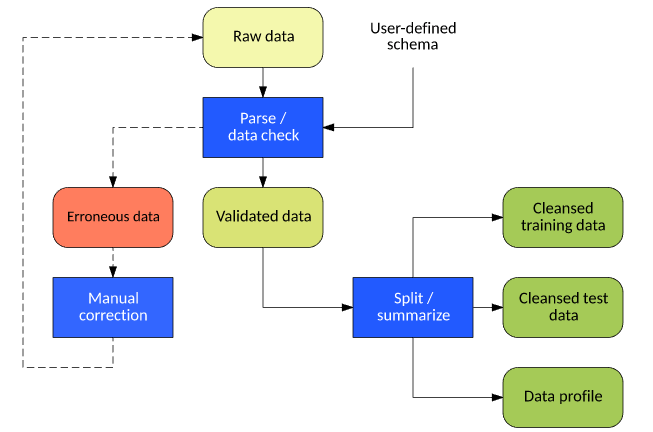
Image Credit: IBM Developer
Setting Data Entry Standards
Let’s face it: prevention is better than cure. The best way to maintain clean data is to stop it from getting dirty in the first place. You should establish clear data entry standards and provide training to everyone who handles data.
For example, create a policy on how dates should be entered. You can also create a dropdown menu for common text entries. These simple best practices for data cleaning can significantly reduce the time spent fixing errors.
Automating Cleaning Workflows
Why am I doing this? The truth is, manual data cleaning is a huge time sink. A 2024 study by IBM revealed that organisations using AI and automation for security save an average of $1.9 million.
While this is primarily about security, the principle applies equally to data quality. Automation is a huge time and money saver. It’s a great data wrangling vs data cleaning technique. It allows you to focus on analysis rather than on fixing data.
You can create automated scripts that run daily or weekly to check for common errors. You can also use tools that automatically fill in missing values. Automating these data preprocessing steps significantly enhances your workflow efficiency.
Regularly Auditing and Monitoring Data Quality
But you’re probably wondering: how do I know if my data is getting messy again? The key is regular audits and monitoring. You should consistently check your datasets for quality issues. You can create a dashboard that shows key data quality metrics.
Look for trends in errors, such as a sudden spike in missing values. Regularly auditing your data ensures that you catch issues early, before they become a major problem. This is one of the most important best practices for data cleaning you can implement.
Conclusion
So there you have it. You now understand the full process of how to clean messy data, from identifying issues to implementing long-term solutions. You’ve seen how important this skill is and how it can help your career.

Now you can take your data skills to the next level. At RKY Careers, we are here to help you upskill, and our data analysis bootcamp is just what you need.
Our data analysis bootcamp teaches you everything from the data cleaning process to advanced analysis techniques. Go ahead and master the data skills that will set you up for a successful career today.
Don’t delay any longer; take action and book a consultation right now!
FAQs
What are the most common types of messy data in analytics?
The most common types of messy data are missing values, duplicate entries, and inconsistent formatting. These can include typos, non-standard date formats, and incorrect data types, which severely impact your analysis.
How do you clean messy data in Excel quickly?
You can clean data in Excel quickly using a few built-in functions. The “Remove Duplicates” tool is very useful. You can also use functions like TRIM to remove excess spaces.
What Python libraries are best for data cleaning?
For Python data cleaning, the Pandas library is considered the best for beginners. It offers simple, powerful functions for handling missing data, duplicates, and various data transformations.
Can AI tools automatically clean messy data for beginners?
Yes, AI tools can automatically clean messy data, and they are becoming more accessible. They can help beginners by detecting and suggesting fixes for common issues, such as typos and inconsistencies. They can even predict missing values.